Elementor audit log for content changes: a workflow teams can trust
When several people update copy across key pages, ambiguity becomes expensive. An audit trail is not bureaucracy. It is a way to keep accountability clear, speed up QA, and reduce support loops.
Why audit log matters in Elementor content workflows
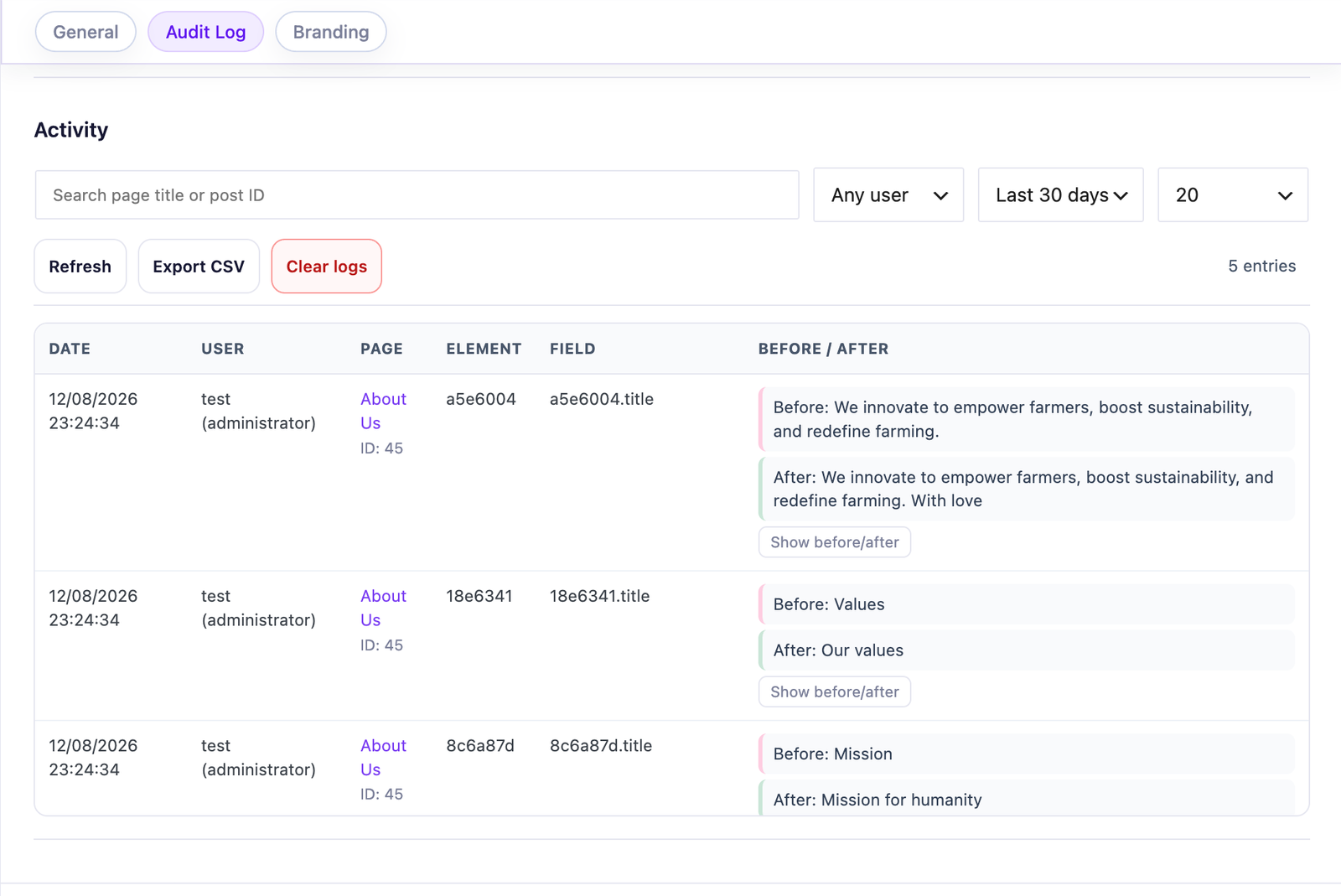
Local accountability: teams can review who changed what, where, and when.
Most teams do not need a formal approval matrix for every text change. They do need a reliable way to answer basic questions quickly: what changed, who changed it, and when. Without that, troubleshooting becomes guesswork.
An Elementor change history makes it possible to track Elementor content changes at field level and see who changed the text without turning each update into an approval process.
Audit visibility reduces friction between agency teams, client content roles, and SEO contributors—but it should be used to recover context, not to monitor people for its own sake.
The most common failure modes without change history
Silent regressions
A CTA changes and conversion drops, but nobody knows when the wording changed.
Duplicate troubleshooting
Two team members investigate the same issue from different assumptions.
Client-agency tension
Requests become subjective when there is no shared event timeline.
What Editly records—and what it does not
Audit Log is a Pro feature and is disabled by default. When enabled, it stores the user, page, field, timestamp, and normalized before/after excerpts in the site’s WordPress database. Those excerpts are capped at 280 characters.
It is not full-page versioning, a backup system, or a replacement for WordPress revisions. Default retention is 90 days and 5,000 entries; administrators can change either limit, export CSV data, or clear the log.
Build a lightweight review system around audit entries
1) Define pages that require traceability
Usually homepage, pricing, legal, and campaign landing pages.
2) Add periodic review windows
Review by risk, not by habit. A weekly check may suit active campaign pages; low-impact pages may need no scheduled review at all.
3) Tie review to ownership
Each page group has one accountable owner who validates updates.
4) Keep escalation simple
If a change is outside safe scope, route it to agency design lane.
Start with one client account and one critical page group.
Keep reporting simple: who changed what this week.
Add white-label and permissions scope for cleaner handover.
Expand only when the routine is stable.
Tell contributors that logging is enabled and explain why. Accountability works best when it is transparent and proportionate. For the exact controls, use the Audit Log documentation; for edition fit, use the Free vs Pro comparison.
Bottom line
An audit trail is useful when it shortens a conversation and restores shared context. Keep it focused, disclose it, and do not mistake more logging for better governance.
FAQ
Elementor audit log FAQ
If more than one person edits high-impact pages, an audit log can save troubleshooting time by restoring the context of a change.
No. Editly stores normalized before/after excerpts capped at 280 characters, plus user, page, field, and time. It is an operational audit trail, not page versioning or backup.
No. Permissions prevent risky actions; audit log explains what happened when changes occur.
Start with pages tied to conversions, legal trust, or paid campaigns.
Yes. Shared timelines reduce blame cycles and make review conversations factual.
When your workflow requires contributor accountability, portfolio scale, or governance beyond basic edit scope.
Editly for Elementor
Protect the page without slowing content work
Combine focused editing, practical text limits, and clearer change context for the pages your team delivers.
By default, the site uses only necessary cookies and storage. With your permission, it can also remember preferences and measure audience activity with Google Analytics. Learn more.
Your Global Privacy Control signal was detected: optional storage remains disabled unless you explicitly choose otherwise.
Privacy
Manage my preferences
You can change or withdraw your permission at any time. Necessary cookies remain active to remember your choice and secure the service.
Necessary
Remember your privacy choice and enable essential functions.
Personalization
Remembers local preferences and adapts the experience to site usage.
Audience analytics
Allows Google Analytics only after your permission. Advertising use remains disabled.