Elementor client handover checklist: a 30-minute safe editing setup
This is the short, operational version of the Editly handover model: what to prepare, what to demonstrate, what to say, and what the client should leave with.
This is the short, operational version of the Editly handover model: what to prepare, what to demonstrate, what to say, and what the client should leave with.
Do not use the client call to discover whether the workflow works. Prepare one role, one representative page, and three tasks the client will genuinely perform. A handover feels trustworthy when the path is already boringly predictable.
Before the call checklist
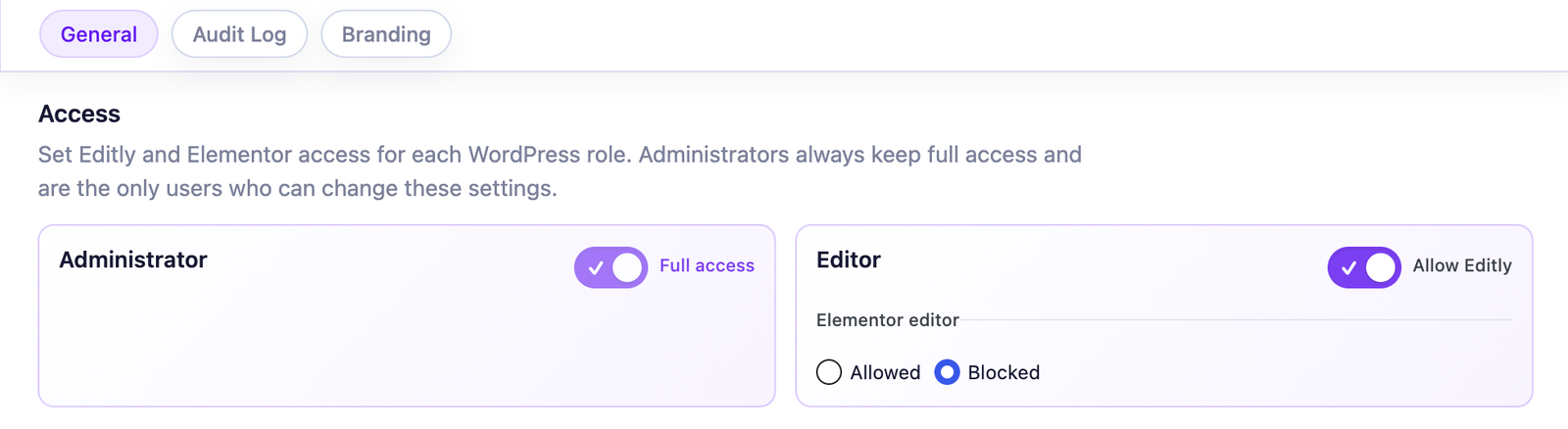
Explain the division in plain language: the client owns everyday copy; your team owns layout, responsive behavior, styling, and structural changes. This prevents the interface demonstration from becoming a vague tour of WordPress.
Use the client account. Ask them to update a real sentence in Editly, save it, and view the live page. Resist the urge to take back control of the mouse when they pause.
Try a longer heading and a CTA label. Show how a configured growth limit can protect compact components, then explain that a limit is a layout guardrail—not a copywriting score.
Use one structural example: “add a pricing column” or “move this section.” Show where that request goes and what response window applies.
Ask: “Which changes will you do here, and which ones will you send to us?” Their answer is a better handover test than asking whether everything was clear.
Use it during the handover
Tick each outcome as the client completes it. Progress stays in this browser tab and is not sent or stored.
0 of 6 outcomes confirmed
Editly is already translated into English plus eight locales (German, Spanish, French, Italian, Dutch, Polish, Brazilian Portuguese, and European Portuguese), so the editing interface can follow many client teams without an English-only training workaround.
Free works well when client-facing copy lives in supported text, textarea, WYSIWYG, and number controls exposed by native Elementor or Elementor Pro widgets. The role-based Elementor restriction is also included in Free. Pro becomes relevant when the handover additionally needs:
If you need the reasoning behind this checklist, read the complete wp-admin workflow guide. For implementation, use the recommended handover setup.
Short answers for the questions that usually appear during or just after the call.
Editly for Elementor
Let routine copy move through a focused wp-admin workflow while your team keeps control of layout and structure.
You can change or withdraw your permission at any time. Necessary cookies remain active to remember your choice and secure the service.
Remember your privacy choice and enable essential functions.
Remembers local preferences and adapts the experience to site usage.
Allows Google Analytics only after your permission. Advertising use remains disabled.