How to let clients edit Elementor text without giving them builder access (wp-admin workflow)
Most clients need speed on copy updates, not full builder controls. This guide explains how to delegate text edits safely in wp-admin while your team keeps control of layout and design structure.
See the focused editing route in context: find a page, update supported text, then save changes together.Read the video summary
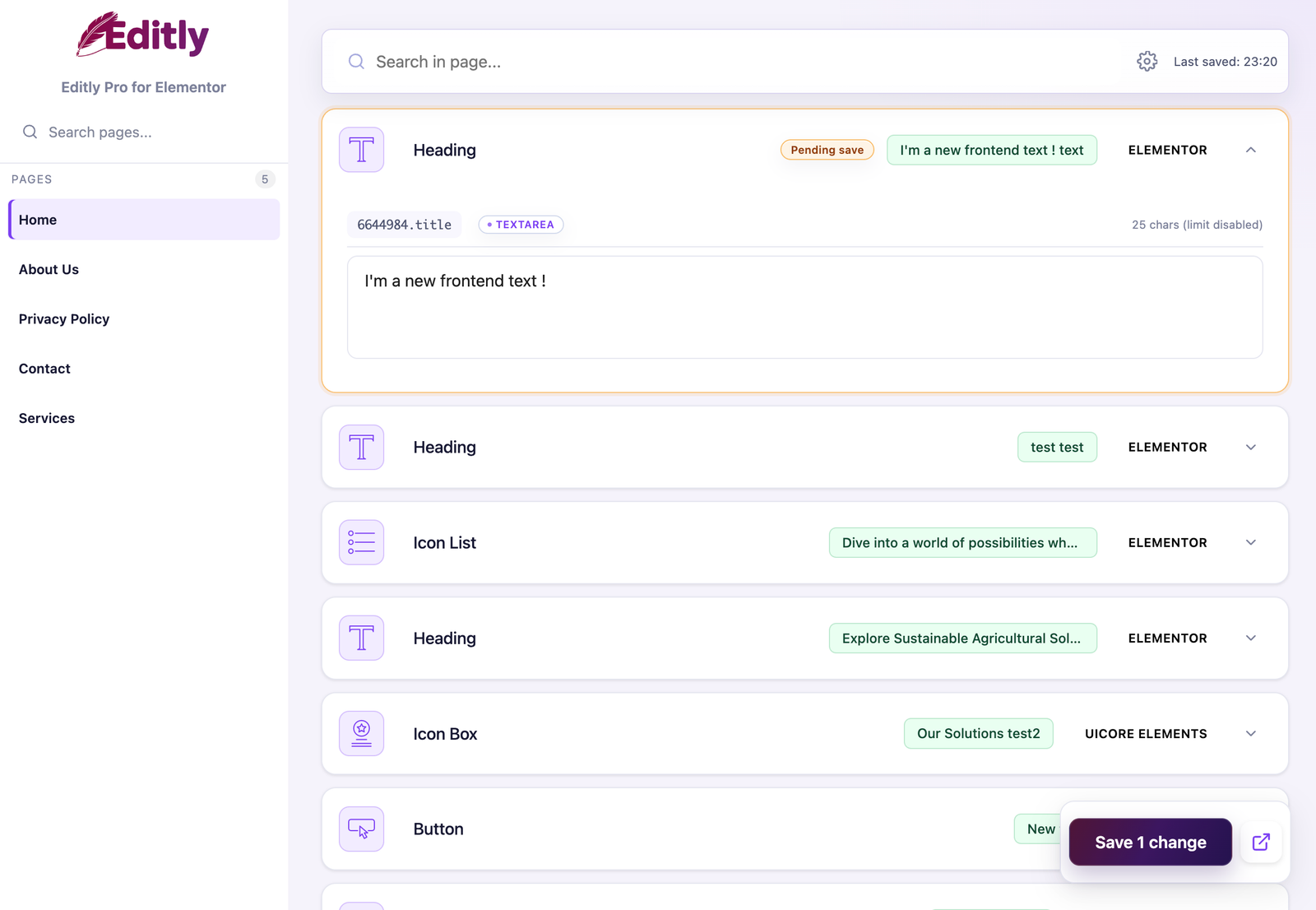
The demonstration shows a user opening Editly in WordPress admin, choosing an Elementor page, finding supported text fields, updating copy, and saving without opening the full builder. Layout, styling, responsive, and structural controls stay outside this routine editing route.
Safe editing essentials
Use wp-admin as the editing lane for routine copy. Clients update headings, paragraphs, and CTA text without needing to open Elementor builder.
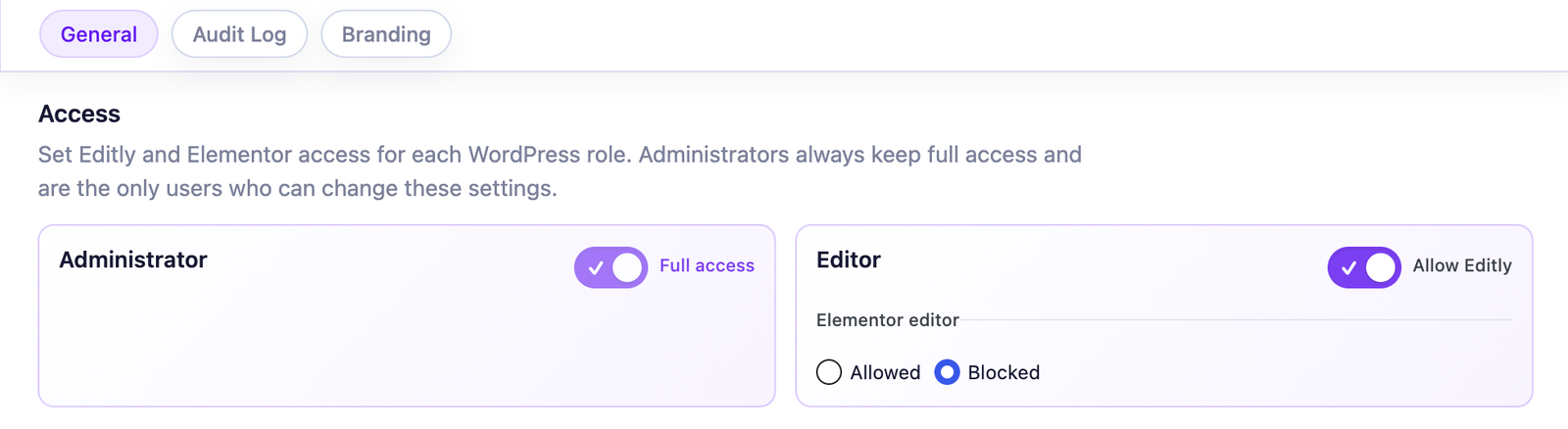
Keep design ownership with your team. Optionally make Editly the only Elementor content editor available to selected non-admin roles; administrators always keep the full builder.
Choose scope early. Free is enough when supported controls in native Elementor and Elementor Pro widgets cover the client-editable copy; Pro adds agency controls such as white label, audit log, and third-party widget support.
If you only read one section, read this one: client autonomy does not require full builder exposure. In most teams, safe autonomy comes from a scoped workflow, clear role boundaries, and an agreed escalation path for non-text requests.
Who this workflow is for
Agencies with active handover cycles
Agencies often deliver multiple Elementor sites per month and then receive recurring micro-edit requests after launch. The challenge is predictable: clients need rapid copy changes, while agency teams need to protect quality and delivery capacity. A client-safe editing workflow reduces post-launch support loops and keeps project quality stable.
This is especially valuable when multiple client stakeholders can request changes: marketing manager, operations lead, sales coordinator, or founder. Without a shared lane for copy updates, every small request becomes a production interruption.
Freelancers managing support alone
Freelancers feel interruption cost faster than larger teams. One “quick update” can break deep-focus work on another project. Using a wp-admin copy workflow reduces context switching and makes support boundaries easier to explain.
The key benefit is not “doing less.” It is doing the right work at the right layer: clients update routine text; the freelancer keeps strategic design and structural implementation under control.
SEO and content teams iterating fast
SEO teams need iteration speed: heading tests, CTA refinements, benefit-driven copy updates, and campaign timing changes. Giving broad builder access for these actions is rarely necessary. A scoped text-edit workflow keeps velocity high while reducing layout regression risk.
This also improves QA conversations. Teams can discuss copy outcomes instead of debugging accidental structural changes.
What Editly does and does not do
Focused editing: clients see the content work that belongs to them, rather than the entire builder.
What Editly does
Lets teams edit supported Elementor text fields from wp-admin.
Supports routine content operations without requiring builder-level actions.
Can dynamically restrict the full Elementor editor for selected non-admin roles while keeping Editly available.
Gives agencies a practical handover model where copy updates and layout ownership are separated.
Provides clear upgrade paths when workflows need broader controls and compatibility.
The supported field families are text, textarea, WYSIWYG, and number controls. Free covers native Elementor and Elementor Pro widgets, including direct fields and one-level repeaters. Dynamic-only values may not surface as editable inputs.
What Editly does not do
It does not disable Elementor globally. The optional rule follows selected WordPress roles, never administrators, and preserves Elementor’s saved Role Manager settings.
It is not a replacement for builder-based design production.
It does not remove the need for role governance and handover policy.
In plain words: Editly is a safe editing layer. It removes the need to open Elementor builder for routine copy edits, while your team keeps Elementor as the design and structure workspace.
Three practical workflows
Role-based control: selected client roles can use Editly while administrators retain Elementor.
1) Agency handover workflow
Goal: reduce post-launch support churn while keeping client autonomy on routine copy tasks.
Define editable scope by page type (homepage hero, service pages, legal pages, campaign pages).
Assign roles, then optionally enable Use Editly as their only Elementor editor for the client content role.
Document one escalation lane for structural requests and one review lane for high-impact pages.
Run one follow-up review two weeks after launch to calibrate real usage.
This workflow prevents the typical ambiguity where clients think every request is “just text,” while agencies see hidden structural implications.
2) SEO iteration workflow
Goal: allow copy iteration speed without opening broad interface surfaces.
SEO/content role updates approved text fields in wp-admin.
Team validates key pages based on impact level (conversion pages first).
Use short review windows to keep momentum (same day or next day).
For multi-contributor teams, add audit visibility to reduce “who changed what” friction.
This model supports frequent optimization cycles while preserving layout consistency.
3) Maintenance plan workflow
Goal: turn recurring small edits into a predictable service lane.
Define “small edit” scope in writing (copy-only, no structural changes).
Add clear monthly boundaries (time bucket or credits) and response SLA.
Enable client self-service for routine copy updates in wp-admin.
Reserve agency intervention for design, structure, and larger content operations.
This reduces interruption cost and keeps support commercial terms easier to enforce.
Free vs Pro scope, clearly stated
Edition
Editing scope
Choose it when
Free
Supported native Elementor and Elementor Pro controls
Delegated copy stays inside the native stack.
Pro
Broader registered third-party widget structures
The handover also needs add-on content, branding, or change history.
The best way to avoid confusion is to set scope before launch and keep one reference for decision-making.
If all delegated copy lives in supported native Elementor and Elementor Pro controls, Free is usually enough for this Elementor client editing workflow.
Free scope (core)
Supported text, textarea, WYSIWYG, and number controls in native Elementor widgets.
The same supported controls in Elementor Pro widgets when Elementor Pro is installed.
Direct fields and one-level repeaters within that supported scope.
Optional Editly-only Elementor editing for selected non-admin WordPress roles.
Strong baseline for agencies and freelancers who need safe delegation quickly.
Both editions ship in English plus German, Spanish, French, Italian, Dutch, Polish, Brazilian Portuguese, and European Portuguese. Translation helps the interface meet the client where they work; the site language itself can be internationalized independently.
Mistake 1: teaching the full interface before defining scope
Many teams start with a tool demo. That feels productive, but it often creates noise first and process second. Clients leave with many possible actions and unclear priorities. A better sequence is: define the exact edit lane first, then train on the lane only.
In practice, this means beginning with the three update types clients request most often: headline updates, CTA text changes, and paragraph refreshes on high-traffic pages. Once these are stable, you can expand only if there is operational need.
Mistake 2: no ownership model after launch
When ownership is unclear, both sides assume the other side is responsible. Client teams think “the agency will fix it,” while agency teams think “the client was trained.” This is where tension starts. Ownership should be written in plain language and repeated during handover:
Client role owns routine copy updates.
Agency role owns layout, templates, spacing, and design systems.
Escalation path exists for requests outside copy scope.
That single model prevents a large share of support ambiguity.
Mistake 3: trying to solve process with verbal warnings
“Please do not touch layout” is not a process. It is a request. Real processes are built with role boundaries, scoped tooling, and concrete review points. The safer your process, the less you rely on user memory during urgent edits.
For teams handling multiple sites, this matters even more. Repeated, predictable workflows are what make operations scale. One inconsistent handover model can generate months of avoidable support.
Mistake 4: no rhythm for content operations
Without cadence, requests arrive randomly and compete with production work. Add a rhythm: routine edits weekly, urgent edits through a narrow path, strategic updates during scheduled review windows. Teams that separate “urgent copy” from “structural requests” keep both speed and quality.
This also improves client communication. People know when things happen and what channel to use.
30-day rollout plan for teams that want this live quickly
Week 1: Scope and governance
List real edit scenarios by page type. Map role ownership in one short handover sheet. Confirm builder policy through WordPress roles and Elementor Role Manager. This week is about clarity, not speed.
Week 2: Pilot on one live page group
Run a pilot on a controlled set (homepage hero + one service page + one campaign page). Let client roles run routine updates in wp-admin. Observe where confusion appears and update the handover notes.
Week 3: Document and standardize
Convert pilot learnings into a repeatable SOP: what is editable, what is escalated, who approves high-impact changes, and where to find support docs. If your team needs stronger client-facing consistency, evaluate white-label settings.
Week 4: Portfolio rollout
Deploy the same process on additional sites. Use one shared checklist and one escalation rule set. For multi-contributor teams, add audit trail early so change visibility is factual from day one.
The outcomes to watch are fewer ad hoc support messages and faster routine copy turnaround.
Yes. Clients update supported fields through Editly. The optional role setting can remove their access to the full Elementor editor while administrators keep it.
Yes. In Free and Pro, enable Use Editly as their only Elementor editor for selected non-administrator roles. The rule is role-based and disabled by default.
Define a copy-only editing lane in wp-admin and keep structure under agency control. Then document one escalation process for non-text requests.
Usually agency admins or trained internal operators. Client-facing content roles can work in wp-admin for routine edits.
Yes. A scoped text workflow is designed for exactly that use case. It keeps iteration speed high while reducing accidental layout changes.
Free exposes supported text, textarea, WYSIWYG, and number controls in native Elementor and Elementor Pro widgets for routine wp-admin edits. Dynamic-only values may not surface as editable fields.
Pro is worth it when your workflow needs third-party widget coverage, white-label handover, or audit accountability across contributors.
It provides a factual change trail. Teams can confirm who changed what and when, which speeds up QA and client communication.
No. It also improves handover clarity by reducing interface noise and aligning the client experience with your delivery model.
Yes. It helps separate routine copy operations from structural work, which makes support scope easier to price and manage.
No workflow removes all risk. This model reduces common layout breakage risk by limiting routine edits to safer fields and clearer role boundaries.
Start with the scope decision on Free vs Pro, apply recommended role setup in docs, and define one handover policy before client launch.
Editly for Elementor
Give clients a safer Elementor editing lane
Let routine copy move through a focused wp-admin workflow while your team keeps control of layout and structure.
By default, the site uses only necessary cookies and storage. With your permission, it can also remember preferences and measure audience activity with Google Analytics. Learn more.
Your Global Privacy Control signal was detected: optional storage remains disabled unless you explicitly choose otherwise.
Privacy
Manage my preferences
You can change or withdraw your permission at any time. Necessary cookies remain active to remember your choice and secure the service.
Necessary
Remember your privacy choice and enable essential functions.
Personalization
Remembers local preferences and adapts the experience to site usage.
Audience analytics
Allows Google Analytics only after your permission. Advertising use remains disabled.