How to train a client on Elementor (without creating a support nightmare)
Training can empower clients, or create long-term support debt. This guide shows what to teach, what to avoid, and how to delegate copy updates without opening the builder for routine edits.
The uncomfortable truth: most Elementor trainings fail for the same reason
Clients usually do not fail because they cannot learn. They fail because the context is wrong: urgent edits, little time, and no margin for experimentation. A builder interface is too broad when the task is only “change one headline.”
Elementor has real depth: structure, responsive behavior, style systems, templates, and widget-level settings. That depth is useful for production teams, but it adds risk for occasional copy edits under pressure.
The better framing is simple: do not “teach Elementor.” Teach a safe workflow for client-safe Elementor editing in wp-admin.
Start with the real job-to-be-done, not the tool
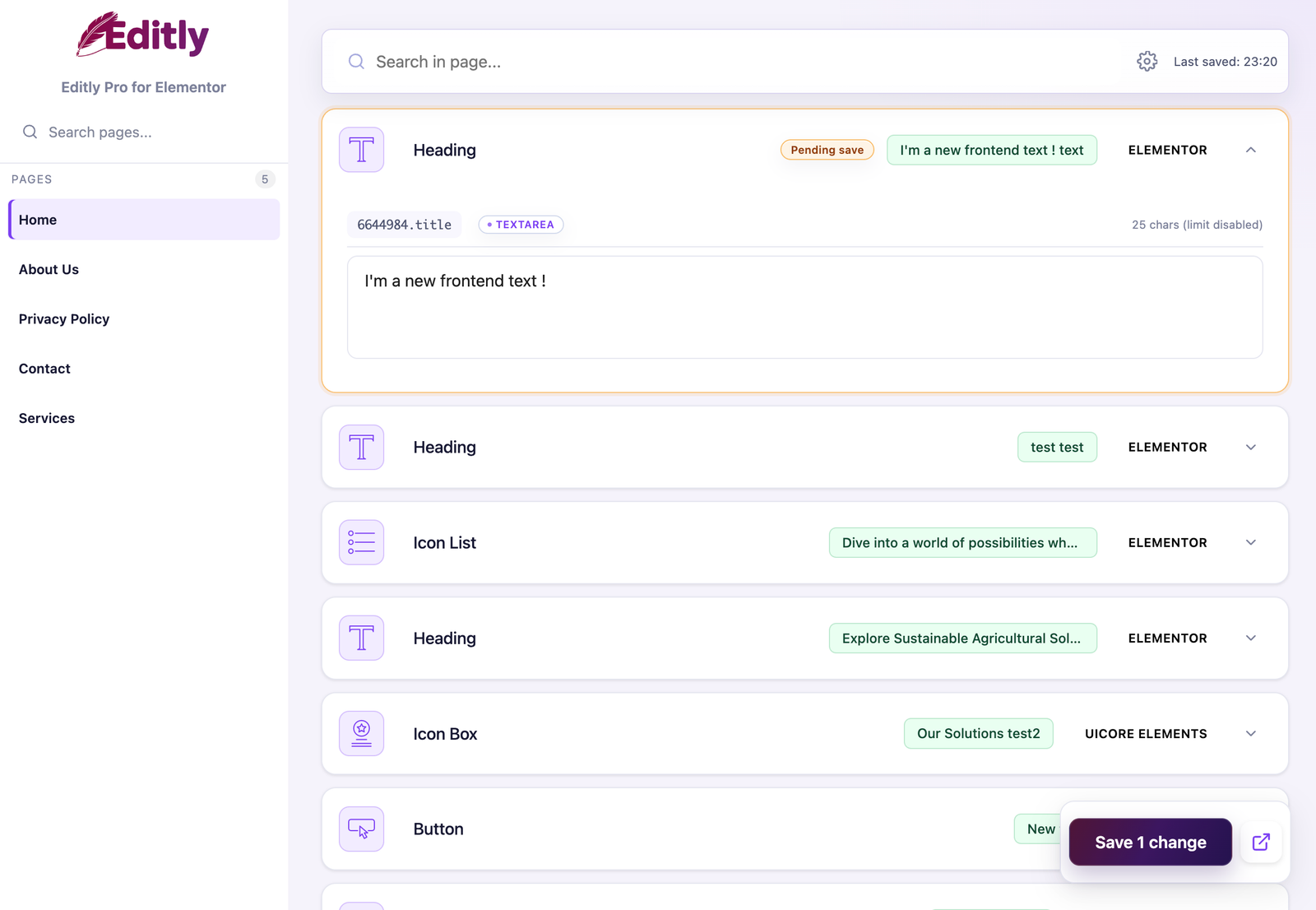
Focused editing: clients see the content work that belongs to them, rather than the entire builder.
Ask for ten typical requests from the last six months. You will usually see the same pattern: typo fixes, CTA wording updates, short section rewrites, legal sentence corrections, and campaign text swaps.
That list becomes your training scope. If an action is frequent and low risk, include it. If an action touches structure or style systems, keep it under agency ownership.
Teach this (high ROI and low risk)
Where text updates happen in wp-admin.
How to review before publish (desktop + mobile sanity check).
How to write layout-safe CTA and heading lengths.
How and when to escalate non-text requests.
Do not teach this by default
Global style systems and responsive settings.
Section/container structure manipulation.
Template and theme builder operations.
Advanced widget settings not required for routine copy.
A 45-minute training agenda
5 minutes: explain who owns copy, layout, and approvals.
10 minutes: demonstrate one update from the client’s actual account.
15 minutes: let the client complete three real tasks without taking over.
10 minutes: rehearse one “this needs the agency” request.
5 minutes: ask the client to explain the workflow back and book the follow-up.
Use the interface language that matches the client where available. Editly ships in English plus German, Spanish, French, Italian, Dutch, Polish, Brazilian Portuguese, and European Portuguese, which reduces the need to teach an English-only admin vocabulary.
Three handover models (choose intentionally)
Model
Access
Best for
A · Full builder
Elementor design surface
Rare clients who genuinely own design production.
B · Restricted builder
Elementor with reduced capabilities
Teams that still need selected builder tasks.
C · Editly-only
Focused wp-admin editing lane
Most routine client content teams.
Model A: full builder access
Appropriate when the client genuinely owns design production and has the time and competence to manage Elementor—not simply because it is the fastest permission decision.
Model B: restricted builder access
Useful when trained operators still need selected Elementor capabilities, but it keeps them inside a broader design interface.
Model C: Editly-only editing for selected roles
Useful when the client’s job is routine content operations. Enable the optional role-based setting in Free or Pro: selected non-admin roles update supported content through Editly, while administrators keep builder ownership for design and structure.
For most content teams, Model C is the safest default. Model A should remain the exception for clients who genuinely own Elementor design production.
If you still want full training: the safe checklist
Full-builder training checklist
Run a 60-minute session on one real page, not a sandbox only.
Define “content edits” vs “layout changes” in writing.
Add a one-page escalation protocol with one contact channel.
Document who owns template decisions after launch.
Schedule a 2-week post-handover review.
Next step
Send a short captioned recording, not a one-hour screen capture. Then schedule a two-week review and adjust the workflow around the questions the client actually asked.
FAQ
Training clients on Elementor: practical FAQ
Usually no. Train on routine copy outcomes first and keep structure decisions within your team.
Use a scoped workflow in wp-admin for text updates and reserve builder operations for authorized roles.
Editable scope, review checklist, escalation rules, and ownership boundaries between client and agency.
Yes. It is often more important for solo teams because interruption cost is higher and context switching is expensive.
When you need broader widget compatibility, white label handover, or audit accountability for change history.
Editly for Elementor
Give clients a safer Elementor editing lane
Let routine copy move through a focused wp-admin workflow while your team keeps control of layout and structure.
By default, the site uses only necessary cookies and storage. With your permission, it can also remember preferences and measure audience activity with Google Analytics. Learn more.
Your Global Privacy Control signal was detected: optional storage remains disabled unless you explicitly choose otherwise.
Privacy
Manage my preferences
You can change or withdraw your permission at any time. Necessary cookies remain active to remember your choice and secure the service.
Necessary
Remember your privacy choice and enable essential functions.
Personalization
Remembers local preferences and adapts the experience to site usage.
Audience analytics
Allows Google Analytics only after your permission. Advertising use remains disabled.