The agency paradox: how to empower clients without compromising your work
Agencies promise autonomy, then fear what happens when clients get full builder access. The paradox is not solved by locking everything or opening everything. It is solved by intentional boundaries.
Clients do want autonomy. But most clients are content operators, not page builders. When they are exposed to nested containers, style controls, and template-level settings, “autonomy” quickly becomes overwhelm.
A better promise is practical autonomy: clients can update copy and keep campaigns moving, while the agency keeps design integrity stable across pages.
When freedom backfires
The backfire pattern is predictable: one urgent copy change becomes a spacing change, then a mobile regression, then a support thread. The issue is not client intent. The issue is interface surface.
If your agency name is attached to the site, visual drift becomes a brand risk. A stable system protects both client confidence and agency reputation.
Protecting your work is not anti-client
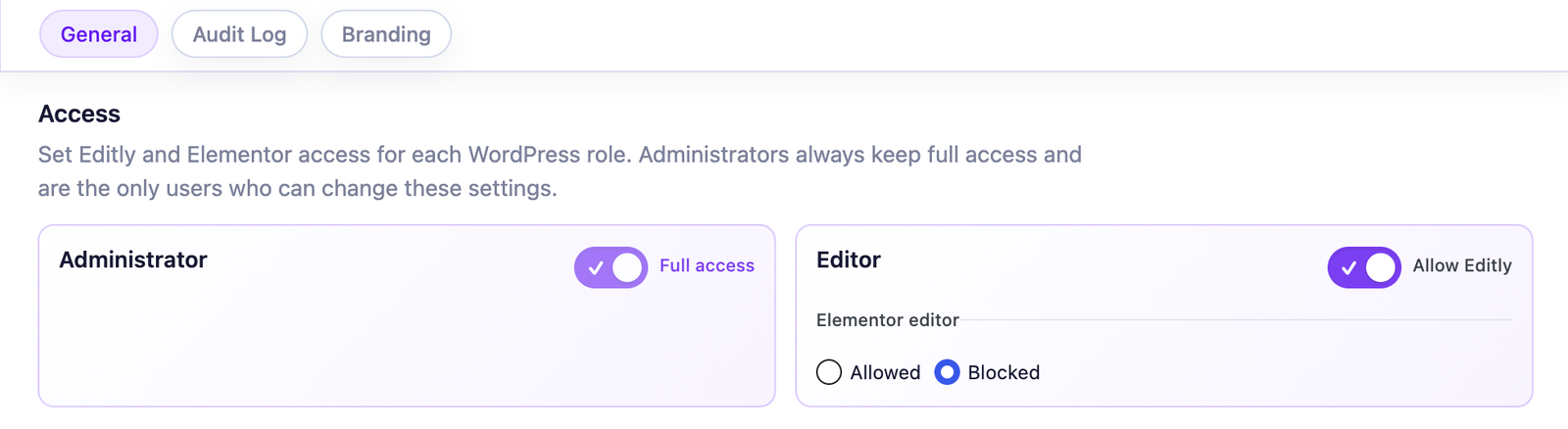
Role-based control: selected client roles can use Editly while administrators retain Elementor.
Empowerment does not mean unlimited backend rights. It means the client can act safely without fear. A useful boundary is one the client can understand: it explains what they can accomplish, not merely what they are forbidden to touch.
In practice this means:
Scoped role access for content updates.
Clear separation between text edits and design edits.
Escalation path for requests beyond safe scope.
A client-facing explanation can be as simple as: “You own everyday copy. We own the system that keeps it looking right.” For agency-facing onboarding, White Label can align the Editly screen with your delivery method.
Operationally, this reduces hidden cost
When boundaries are explicit, teams spend less time diagnosing preventable regressions and more time on strategic work. This is where a lightweight activity trail becomes useful; Audit Log helps clarify who changed what when reviews are needed.
The gain is not only fewer repairs. It is a calmer relationship: the client knows where to act, the agency knows when to step in, and neither side has to renegotiate the boundary during an urgent update.
A practical implementation sequence
Week 1: define safe scope
List the five changes the client is most likely to make. Write the list in their language: “change opening hours” is clearer than “edit a text control.”
Week 2: apply permissions
Choose the relevant WordPress role and, if appropriate, make Editly its only Elementor content editor. The rule is role-based, disabled by default, and never applies to administrators.
Week 3: handover rehearsal
Ask the client to run three real scenarios while you watch. Notice hesitation, unfamiliar labels, and missing content—not only mistakes.
Week 4: governance and scale
Add accountability only where it solves a real coordination problem. If your stack includes add-on widgets, validate the specific pages and controls you intend to delegate through third-party widget support; custom or dynamic controls still deserve a pilot.
Closing point
The paradox disappears once autonomy is redefined as confidence, not access volume. Start with the client’s real jobs, use Free vs Pro comparison for technical scope, and keep the human promise consistent: everyday changes should feel easy and safe.
FAQ
Common agency questions
Frame restrictions as quality and speed safeguards, not permission denial.
For routine tasks, a focused editing path is often easier to learn and use than broad technical control. Confirm that preference during handover instead of assuming it.
Add it when multiple contributors edit high-impact pages and you need clear change accountability.
Pro resolves registered third-party widget schemas through its universal engine. Validate your actual add-on stack before a broad rollout because custom and dynamic controls can behave differently.
Train around real tasks first. Expand only if there is a clear operational need.
Use Free for native scope. Move to Pro when you need white label, audit visibility, or broader widget support.
Editly for Elementor
Turn safer editing into a stronger handover
Give clients useful autonomy while preserving the design quality and operating model behind your service.
By default, the site uses only necessary cookies and storage. With your permission, it can also remember preferences and measure audience activity with Google Analytics. Learn more.
Your Global Privacy Control signal was detected: optional storage remains disabled unless you explicitly choose otherwise.
Privacy
Manage my preferences
You can change or withdraw your permission at any time. Necessary cookies remain active to remember your choice and secure the service.
Necessary
Remember your privacy choice and enable essential functions.
Personalization
Remembers local preferences and adapts the experience to site usage.
Audience analytics
Allows Google Analytics only after your permission. Advertising use remains disabled.