Why client autonomy is the most underrated sales argument in freelance web design
“Can I edit the site myself afterwards?” sounds like a simple question, but it reveals one of the strongest buying triggers in freelance projects: the need for control without technical stress.
When you frame your offer around client-safe Elementor editing, you stop selling just pages and visuals. You sell operational confidence: the client can move quickly, while you protect quality.
Most clients are not asking for full backend power. They are asking for agility in routine moments: fixing a typo, updating opening hours, adjusting a campaign headline, or changing CTA copy before a launch. They want to act quickly without opening a ticket for every minor change.
This is where many service offers miss the mark. We answer with “yes, WordPress allows that,” but we rarely define how the client can edit safely. Without that clarity, autonomy turns into uncertainty, and uncertainty turns into support load.
Why freelancers hesitate to offer access
The hesitation is rational. Most freelancers have seen at least one client accidentally shift spacing, remove a section, or overwrite styling while trying to “just update text.” Then the fix comes back to the freelancer, often in urgent mode.
So the default reaction is either:
Lock everything and keep the client dependent.
Give full builder access and hope they avoid risky controls.
Both options create friction. The better middle ground is a scoped editing layer where clients can edit Elementor text from wp-admin without touching structure.
Client autonomy does not make you irrelevant
Freelancers often worry that if clients can edit content themselves, retainers disappear. That fear confuses dependence with value. A client who no longer needs you for a typo can still need you for strategy, conversion work, technical SEO, redesign decisions, and quality governance.
The honest sales position is not “you will never need me again.” It is “you will not need to wait for me to keep everyday content accurate.” Your higher-value work remains visible because it is no longer buried under low-value interruption.
Proposal language that sets the right expectation
“Your team will be able to update approved Elementor copy from a focused wp-admin screen. We retain ownership of layout, responsive behavior, and design-system changes, with a clear request path when those are needed.”
A practical safe handoff model
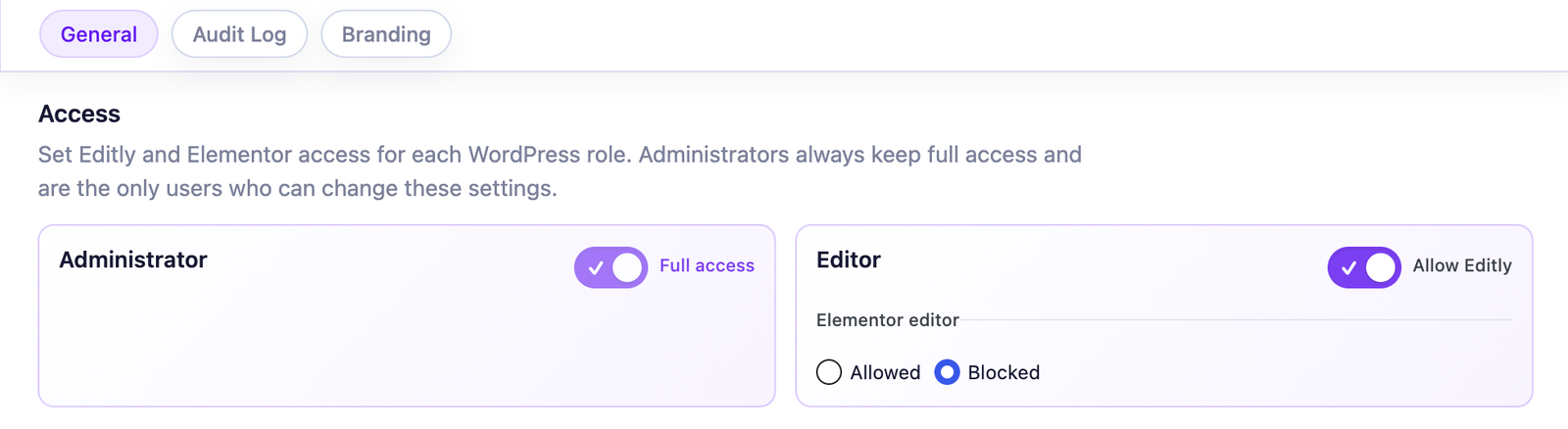
Role-based control: selected client roles can use Editly while administrators retain Elementor.
Use four layers in your delivery process:
1) Scope boundary
Define what self-service means (headings, paragraphs, CTA labels) and what stays agency-side (layout, spacing, style systems).
2) Permission boundary
Map roles to responsibilities, not job titles. Apply clear limits through your role model and editor workflow. For implementation details, use Roles & Permissions docs.
3) Workflow boundary
For sensitive pages (homepage, legal, core service pages), require a short validation pass before publish.
4) Accountability boundary
If multiple contributors touch key pages, add change visibility through Audit Log.
The subtle twist: autonomy grows faster with safer editing than with full builder access
Full builder access looks like freedom, but for non-technical users it often means cognitive overload. A scoped editing surface is easier to learn, easier to trust, and easier to use under pressure.
This is where product scope matters. Free covers supported text, textarea, WYSIWYG, and number controls in native Elementor and Elementor Pro widgets. If your clients use third-party widget packs, Pro’s universal schema engine broadens coverage, but your real stack should still be piloted before the promise enters a proposal.
If you still want to train them: the safe checklist
Safe autonomy checklist
Teach outcomes first: “update offer copy,” not “navigate all widgets.”
Use 3 real scenarios from their weekly operations.
Separate text editing from layout editing in the training language.
Create one quick handoff SOP (video or PDF) with escalation rules.
Schedule a 2-week review after launch to tighten boundaries.
Final takeaway
Autonomy is not a checkbox at the end of delivery. It is part of the offer itself. Sell the relief of a clear operating model, not the quantity of controls exposed.
Short answers you can reuse in proposals, kickoff calls, and handoff docs.
No. Client autonomy means safe, fast updates for routine content tasks. Builder access is a broader technical permission that most clients do not need.
Headings, paragraph text, and CTA copy are usually enough for everyday operations. Layout and style controls should stay scoped.
Frame boundaries as quality protection: clients can move faster on content, and the site remains visually consistent.
White label helps when agencies want a cleaner client-facing backend and a more consistent service presentation.
Define scope, permissions, and escalation rules before launch, then review how clients use the workflow after two weeks.
Yes. It clarifies scope early and avoids future confusion when teams need white label, audit visibility, or broader widget coverage.
Editly for Elementor
Turn safer editing into a stronger handover
Give clients useful autonomy while preserving the design quality and operating model behind your service.
By default, the site uses only necessary cookies and storage. With your permission, it can also remember preferences and measure audience activity with Google Analytics. Learn more.
Your Global Privacy Control signal was detected: optional storage remains disabled unless you explicitly choose otherwise.
Privacy
Manage my preferences
You can change or withdraw your permission at any time. Necessary cookies remain active to remember your choice and secure the service.
Necessary
Remember your privacy choice and enable essential functions.
Personalization
Remembers local preferences and adapts the experience to site usage.
Audience analytics
Allows Google Analytics only after your permission. Advertising use remains disabled.